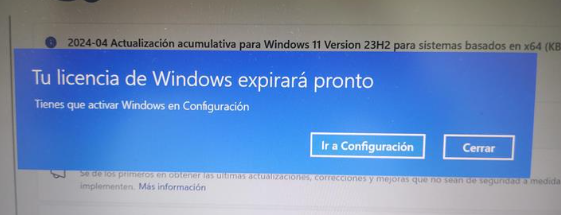
- Revisar la versión de Windows:
Ingresar al cmd y colocar el siguiente comando: winver
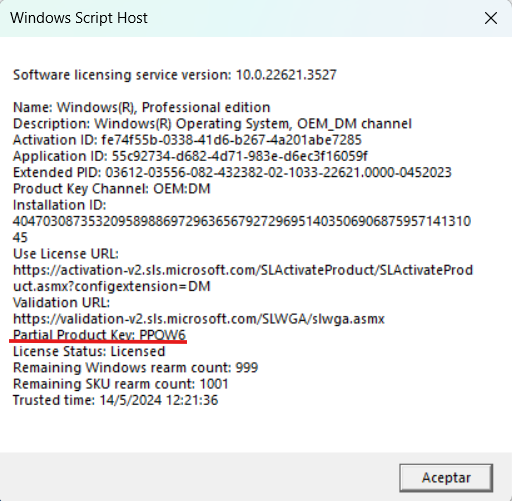
- Revisar la información de la licencia de Windows
En el cmd colocar el el siguiente comando: slmgr /dlv
- Verificar la clave de la licencia de Windows
En el cmd colocar el siguiente comando: WMIC Path SoftwareLicensingService Get OA3xOriginalProductKey

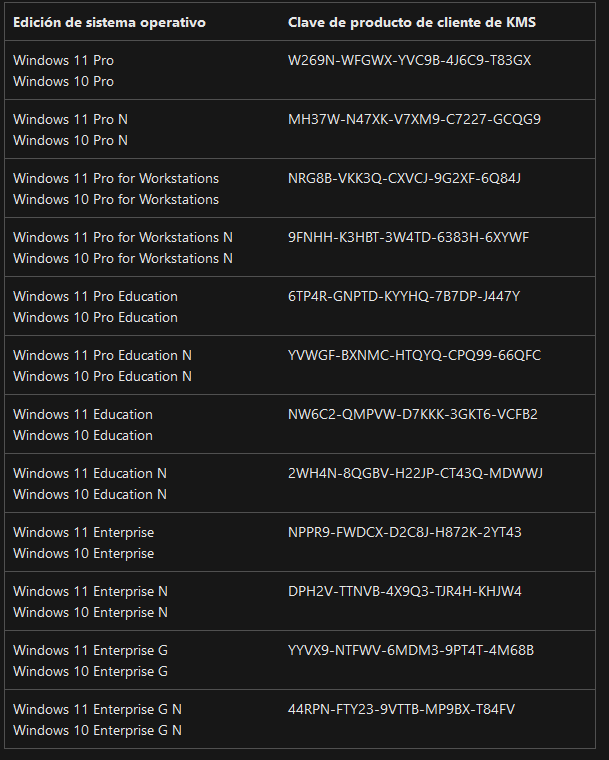
- En el caso de no tener un resultado de la clave de la licencia, verificar si es una licencia por volumen genérica
Ingresar al siguiente enlace: https://learn.microsoft.com/es-es/windows-server/get-started/kms-client-activation-keys?tabs=server2025%2Cwindows10ltsc%2Cversion1803%2Cwindows81
Para reinstalar la licencia se debe utilizar el comando slmgr en modo administrador.
slmgr [MachineName [username [password]]] [option]
| Slmgr Command Options | |
|---|---|
| Item | Explanation |
| MachineName | The machine to administer. Defaults to the local machine if omitted. |
| username | The username of an administrator account on the remote machine. |
| password | The password for username. |
| /ato | Activate Windows license and product key against Microsoft's server. |
| /atp Confirmation_ID | Activate the product with a user-provided Confirmation_ID. |
| /cdns | Disable DNS publishing by the KMS host. |
| /ckhc | Disable KMS host caching. |
| /ckms | Clear the name of KMS server used to default and port to default. |
| /cpky | Delete the Windows product key from Windows Registry. |
| /cpri | Set the KMS priority to low. |
| /dli | Display the current license information with activation status and partial product key. |
| /dlv | Display additional license information. Similar to /dli but more detailed. |
| /dti | Display Installation ID for offline activation. |
| /ipk key | Change the Windows product key. Replaces the current product key if present. |
| /ilc file | Install a license file. |
| /lil | List installed token-based activation issuance licenses. |
| /ril | Remove installed token-based activation issuance license. |
| /rilc | Reinstall system license files. |
| /rearm | Reset the evaluation period/licensing status and activation state of the computer. Use /rearm-app to specify an app, or /rearm-sku for a specific sku. |
| /skms | Set the Volume Licensing KMS server and/or the port used for KMS activation. |
| /skhc | Enable KMS host caching (enabled by default). This blocks the use of DNS priority and weight after the initial discovery of a working KMS host. |
| /sai interval | Sets the interval in minutes for unactivated clients to attempt KMS connection. |
| /spri | Set the KMS priority to normal (default). |
| /sprt port | Set the port on which the KMS host listens for client activation requests (default TCP port is 1688). |
| /sdns | Enable DNS publishing by the KMS host (default). |
| /upk | Uninstall the currently installed Windows product key and return the license status back to a trial state. |
| /xpr | Show the expiry date of the current license or indicate whether activation is permanent. |
SOLUCIÓN
Utilizar las licencias por volumen adquiridas con Microsoft, a estas se puede acceder con la cuenta TICs ingresando al portal de administración: Facturación --> Sus productos --> Licencias por volumen --> Productos y servicios --> ver descargas y claves
¿Le fue útil este artículo?
¡Qué bueno!
Gracias por sus comentarios
¡Sentimos mucho no haber sido de ayuda!
Gracias por sus comentarios
Comentarios enviados
Agradecemos su iniciativa, e intentaremos corregir el artículo